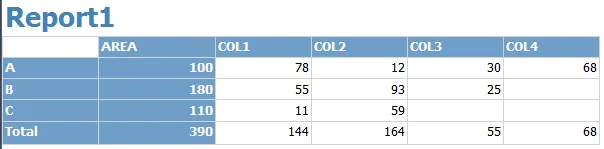
I have been struggling with an issue in SSRS for some time now and finally solved the issue:
The Issue
I have this data:
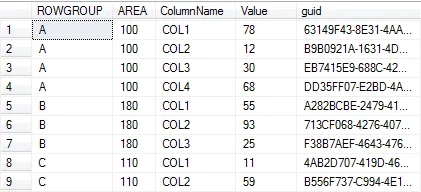
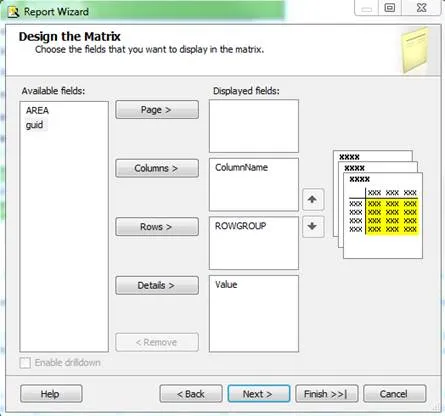
In the report I want the ROWS and COLUMNS to be dynamic, adding a matrix table to the report and setting the ROWGROUPS to the rows and ColumnName to the Columns and Value to the Details:
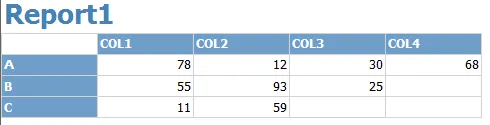
When running the report it displays correctly:
Now I want to add the AREA to show the ROWGROUPs fictional areas, I only want to show the AREA for each ROWGROUP and not the sum :
So not ![The AREA cell set to [Sum(AREA)]](/_astro/sum-area.CyDFy-Tn_17cIj5.webp) but
but ![The AREA cell set to [AREA]](/_astro/area.CjuR0YDZ_9UkDL.webp)
This displays correctly:
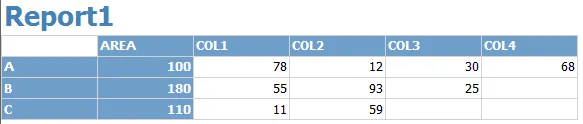
Now I want to add a Total at the bottom, the issue here is that ssrs sums the AREAs like such:
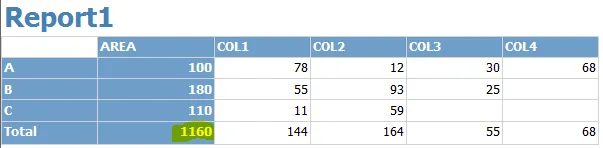
The Solution
One way of getting the correct total of the AREA column is to add 2 new columns to our sql query:
SELECT Test.* ,ROW_NUMBER() OVER (ORDER BY ROWGROUP) AS 'RowNumber' ,RANK() OVER (ORDER BY ROWGROUP) AS 'Rank'FROM Testand using an expression on the AreaTotal:
=Sum(IIf(Fields!Rank.Value = Fields!RowNumber.Value, Fields!AREA.Value, 0))Producing the desired result: